In practice, most serious OpenClaw workflows drift toward some kind of hybrid: development and experimentation locally, plus a small but reliable cloud node for always‑on agents.
My hybrid setup: local + cloud
Personally, I run OpenClaw in both places and let each environment do what it’s good at. My setup started from a very pragmatic place: I had an old, under‑utilized gaming laptop lying around at home, and I paired it with a small Hetzner VPS.
Side‑by‑side specs: local vs cloud
| Local ROG laptop | Cloud Hetzner VPS | |
|---|---|---|
| Form factor | Repurposed old gaming laptop | Cloud VM, always‑on server |
| Location | At home | Singapore data center |
| CPU | 13th Gen Intel Core i9‑13980HX (2.20 GHz), 64‑bit | 2 vCPUs |
| RAM | 32.0 GB installed (31.6 GB usable) | 4 GB RAM |
| GPU | NVIDIA GeForce RTX 4090 Laptop GPU (16 GB VRAM) + Intel UHD | CPU‑only (no dedicated GPU) |
| Storage | 1.84 TB total NVMe (hundreds of GB free) | 80 GB local disk |
| Network | Home internet | 1 TB outbound traffic quota |
| OS & access | Windows + WSL2/Linux, full admin access | Ubuntu with full root access via SSH |
This combination lets me treat the ROG laptop as my “creative lab” for local models, and the Hetzner VPS as my reliable, boring worker that quietly keeps agents and services running.
Local: ROG laptop as development and model box
Locally, I work on a Republic of Gamers laptop as my main development and experimentation machine. It started as an under‑used gaming laptop; now it’s my dedicated local‑models box.
On this machine I:
- Run OpenClaw plus local models (via tools like Ollama) for coding assistance and agent experiments, which helps me save API tokens and keep local code and data private.
- Use it as my main FastAPI/agent development box (via WSL2/Linux), iterating quickly on tools, missions, and workflows before pushing anything to production.
- Treat it as a “lab” where I can afford to break things, try new skills, and run heavier models that wouldn’t fit comfortably on a small VPS.
Because it’s my own hardware with a strong GPU and 32 GB RAM, I’m comfortable running larger or custom models here that a cheap cloud instance couldn’t handle efficiently.
Cloud: Hetzner VPS for always‑on automations
For the cloud side, I use a Hetzner cloud server, specifically because it gives me full root access on Ubuntu and behaves like a real Linux box I control end‑to‑end.
On Hetzner I:
- Host always‑on projects and business automations that need to stay up 24/7, including web apps and collaborative workflows that do not depend on my personal laptop being awake.
- Run scheduled OpenClaw workflows—things like recurring research, scraping, or daily/weekly updates—using systemd and timers or cron‑style schedulers, so they continue even when my laptop is closed.
- Keep a small OpenClaw setup there as an “online agent worker”, separate from my local experiments, which can respond to external triggers and webhooks reliably.
Hetzner hits a nice balance for me: low cost, good performance, data in the EU/Asia regions, and full control (root access, systemd, firewalls, etc.) without the heavy complexity of a giant cloud platform.
When local fails: my month‑long stress test
One thing I didn’t appreciate enough at first: a powerful laptop is still a single point of failure when you treat it as both your main computer and your “server”.
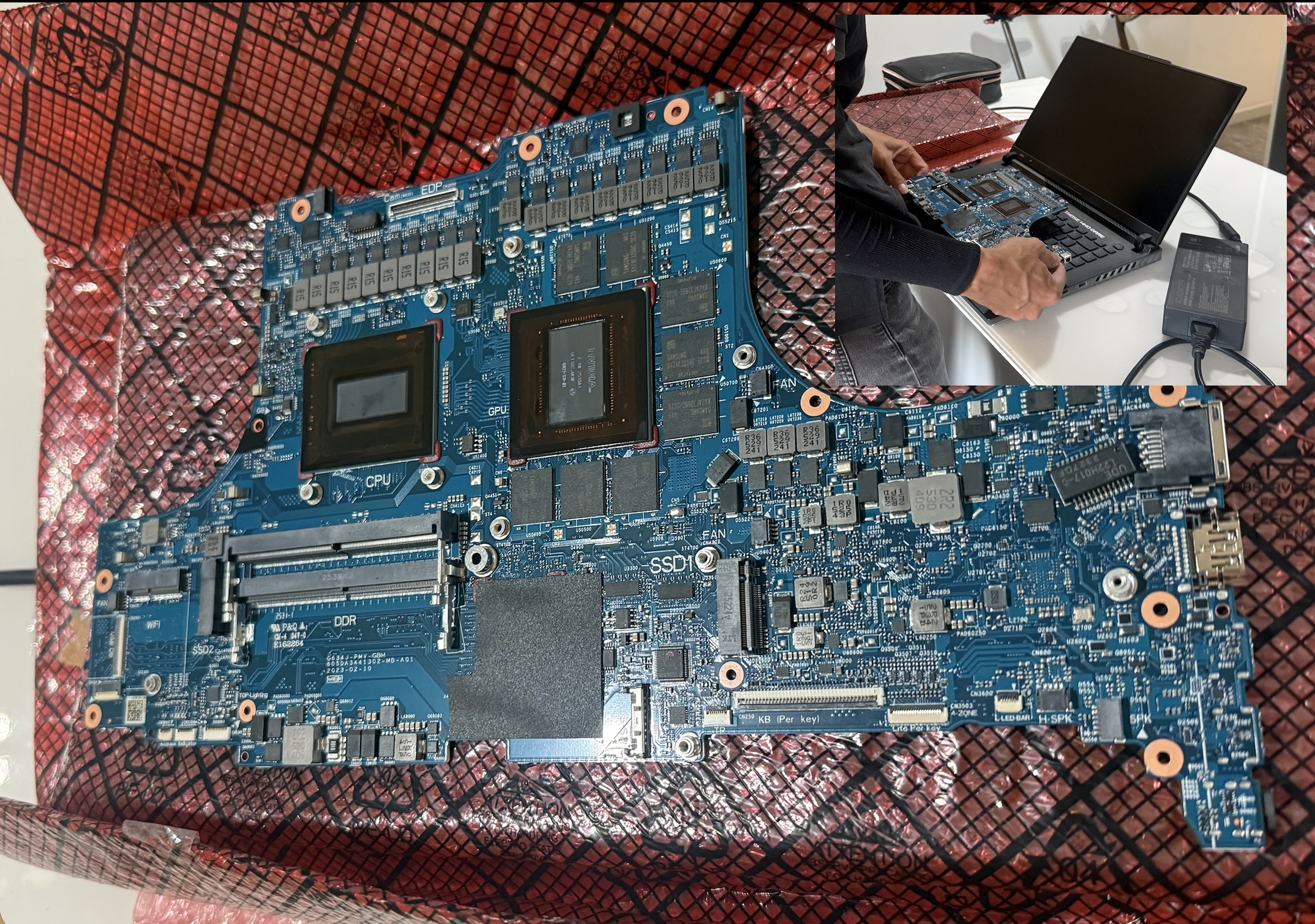
After running AI agents on my ROG laptop more or less continuously for over a month, it suddenly blacked out with no warning—no lights on power‑on, nothing. Most of my code was version‑controlled and safe, but not all of my personal data and “memories” were backed up, and if I had only been running local models, every agent and automation would have gone down instantly.
Thankfully, it was diagnosed as a burnt motherboard, and the laptop was fully recovered after replacing the board. But that scare changed how I think about my architecture: I now care a lot more about both data backup and privacy‑aware cloud usage—syncing important stuff off the machine, using the cloud for redundancy, and making sure that if my laptop dies again, my critical agents and long‑running jobs keep going somewhere else.
A quick hardware selector mindset
When choosing hardware for OpenClaw or any always‑on agent stack, I find it useful to adapt a simple “hardware selector” mindset:
-
Start with spare hardware
If you already have a second machine you can leave running 24/7, that’s usually the default answer, even if it has less than 32 GB of RAM. You can still run a hybrid setup there: cloud APIs plus small local models for lightweight tasks. -
For new purchases, 32 GB RAM is the floor
OpenClaw runs long‑lived processes and often uses local models, so for a fresh buy I treat 32 GB RAM as a hard minimum and only go lower when I’m repurposing something I already own. -
Decide between VPS vs dedicated box
- If you prefer pay‑as‑you‑go, a small VPS (Hetzner, DigitalOcean, etc.) is enough to host agents that lean on cloud APIs.
- If you want local‑first, minimal monthly cost, a 32 GB+ mini PC or Mac Mini becomes your long‑term agent host. -
Be honest about your technical comfort
Very comfortable with terminals and SSH? A VPS is easy to live with. Prefer plug‑and‑play? A small, dedicated local machine that you own and can leave running often feels simpler than juggling remote Linux servers.
I still use my main laptop heavily, but I try not to treat it as the permanent “server” anymore; anything that absolutely must stay up moves to a dedicated machine or VPS.
Key questions before you choose
These questions usually decide whether local, cloud, or hybrid makes more sense:
-
Do you need offline models or strict data privacy?
If you want to keep data on your own hardware and run models fully offline (Ollama, LM Studio, etc.), local is very attractive. -
Do you need agents running on a schedule, 24/7?
Things like web‑scraping, YouTube/website monitoring, daily research digests, and scheduled report generation are much smoother on a cloud instance that never sleeps. -
Are you using large models that need a GPU?
Your own GPU machine may handle bigger models than a typical cheap VPS tier, but a GPU cloud instance will cost a lot more than a small CPU box. -
Who are the “users” of your agents?
If it is just you, local is fine. If you have clients, teammates, or public endpoints, uptime and network reliability matter a lot more, which pushes you toward the cloud. -
How much ops friction can you tolerate?
Local means dealing with sleep/hibernate, OS updates, and your own internet connection, while cloud means dealing with SSH keys, firewall rules, systemd, backups, and monitoring.
Once you’re honest about those constraints, the trade‑offs between local and cloud become clearer.
When a local OpenClaw setup shines
Local is usually the best place to start if you have decent hardware and you’re doing personal or early‑stage work.
1. Offline models and privacy
- You can run models like Qwen, Llama, or Code LLMs locally via Ollama or similar, and keep all prompts, code, and data on your machine.
- This matters when you’re experimenting with sensitive codebases, internal data, or client information, and you don’t want raw context going to external APIs.
2. Big or experimental models on your own GPU
- A good local GPU machine can run models that a cheap VPS simply can’t handle, especially if the VPS has no GPU at all.
- You’re constrained by your own VRAM and RAM, not by a provider’s “small instance” limits or API quotas.
3. Tight development feedback loops
- Iterating on tools, skills, and agents is fastest when everything is on the same box as your editor and terminal.
- You can attach debuggers, inspect local files, and quickly restart processes without worrying about SSH latency or deployment steps.
4. Cost control for heavy experimentation
- If you’re hitting models constantly during development, running local can save a lot of API spend.
- You pay once for hardware and power, instead of on‑demand GPU cloud instances or per‑token API charges.
The downside: your local machine must stay awake and connected for agents to keep working, which is a deal‑breaker for long‑running or client‑facing workflows.
When a cloud OpenClaw setup is better
Cloud comes into its own the moment you care about reliability, 24/7 availability, or serving others.
1. Always‑on, scheduled agents
- Cron‑like jobs for OpenClaw—daily research scrapes, RSS/YouTube monitoring, nightly backtests, weekly summary emails—are a natural fit for a VPS or cloud instance.
- The box stays up even if your laptop is closed, powered off, or offline.
2. Serving external users and clients
- If you expose OpenClaw via HTTP APIs, web frontends, or Chat/WhatsApp bots, users expect it to be up even when you’re asleep.
- Cloud instances sit behind stable IPs and domains; you can put them behind reverse proxies, TLS, and WAFs, and plug in monitoring/alerting.
3. Isolation and separation of concerns
- Running OpenClaw in the cloud lets you separate development and production.
- You can treat the cloud instance as a “worker box” that only runs vetted agents and tools, while you do messy experimentation locally.
4. Simpler networking and integrations
- Webhooks, third‑party APIs, and external tools integrate more cleanly when your OpenClaw endpoint is a fixed URL on the internet, not a laptop behind NAT.
- It’s easier to plug OpenClaw into SaaS tools, CRMs, or client systems when it’s sitting on a VPS with proper DNS and SSL.
The trade‑off: at the cheaper tiers, these cloud instances are CPU‑only and RAM‑limited, so you typically cannot host very large local models directly on them unless you pay for a GPU server. You’ll often pair them with smaller, faster models (or call external APIs) instead of running giant LLMs locally in the cloud.
A note on Hostinger and sponsored tutorials
If you search YouTube for “OpenClaw setup”, you’ll notice many tutorials deploying on Hostinger, often with clear sponsorships or affiliate links in the description. That’s totally fine, but it also means Hostinger is frequently presented as the “default” choice, even if it may not be the best fit for someone who wants a very bare‑bones, tinkerer‑friendly VPS.
If you do go with Hostinger, make sure you’re looking at their VPS plans, which do include full root access, rather than their shared hosting products, which do not. I personally prefer a simple KVM‑style VPS like Hetzner where I control the entire box end‑to‑end, and this post is not sponsored, contains no affiliate links, and reflects my own independent judgement about what has actually worked for my OpenClaw and AI agent workflows.
How I divide responsibilities between local and cloud
Putting this together, the division of labor looks like:
- Local (ROG laptop):
- Heavy experimentation, fast iterations, and local tools.
- Offline/near‑offline models and anything privacy‑sensitive.
-
Big or experimental models that benefit from my own GPU.
-
Cloud (Hetzner Ubuntu VPS):
- Always‑on OpenClaw workers for web‑scraping, research refreshes, and daily/weekly updates.
- Client‑facing or collaborative agents, endpoints, dashboards, and bots that must be reliable and not tied to my laptop’s sleep cycle.
- A small, stable OpenClaw deployment that is boring on purpose.
This way I get the best of both worlds: the freedom and power of a local GPU machine, plus the reliability and uptime of a cloud box that can quietly keep agents running in the background—even if my laptop is powered off, in repair, or completely dead.
P.S. This piece was largely written with an LLM that has seen a lot of my configs and rants. For a robot co‑author, it didn’t do too badly.