Most AI tools for operations teams hand over an answer and a confidence score. When the answer is wrong, nobody can say why, so staff either stop checking or check everything by hand. Both end the same way: the tool is abandoned or it ships a mistake.
QuotationAI is built on a different contract. It owes the person using it its working, every time, on screen, in their own trade vocabulary. This article is the full tour: what it reads, how it ranks, what it shows, what it refuses to do, how it is measured, and how staff are trained to check it.
Everything below is live in a marine spares distributor's sales inbox in Singapore. The screenshots are from the working replica on rpascale.org, which runs the same ideas on an invented catalogue so nothing sensitive is shown.
Where it lives
QuotationAI is a panel inside the CRM's Email tab. A salesperson opens a customer's enquiry — an email with a parts list, often with a spreadsheet or a photo attached — and presses QuotationAI. It opens on the newest message by default, or on a chosen message in a long thread, and it shows what we sent for any earlier reply so the person can see what was already offered.
It is only offered on real enquiries. A delivery chase, a statement of account or a supplier's price list is not one, and the first lesson in the training course is telling those apart before touching anything.
The split
The email body, the text of attachments and the text inside pasted pictures are read and split into one line per item. Lines that are greeting, signature or address are set aside, and the panel says how many: "5 line(s) set aside as greeting, signature or address", with the list one click away. Nothing disappears silently.
A photograph of a part is not used to choose an item. Text in a screenshot is read; a picture of a valve is not a specification.
What it understood: the tokens
Every line is read into attributes before anything is matched: product, type or family, size, material, connection, pressure, series. Trade shorthand is expanded on the way — 2" becomes DN50, brz becomes bronze, vlv becomes valve — and every rewrite is kept so it can be shown.
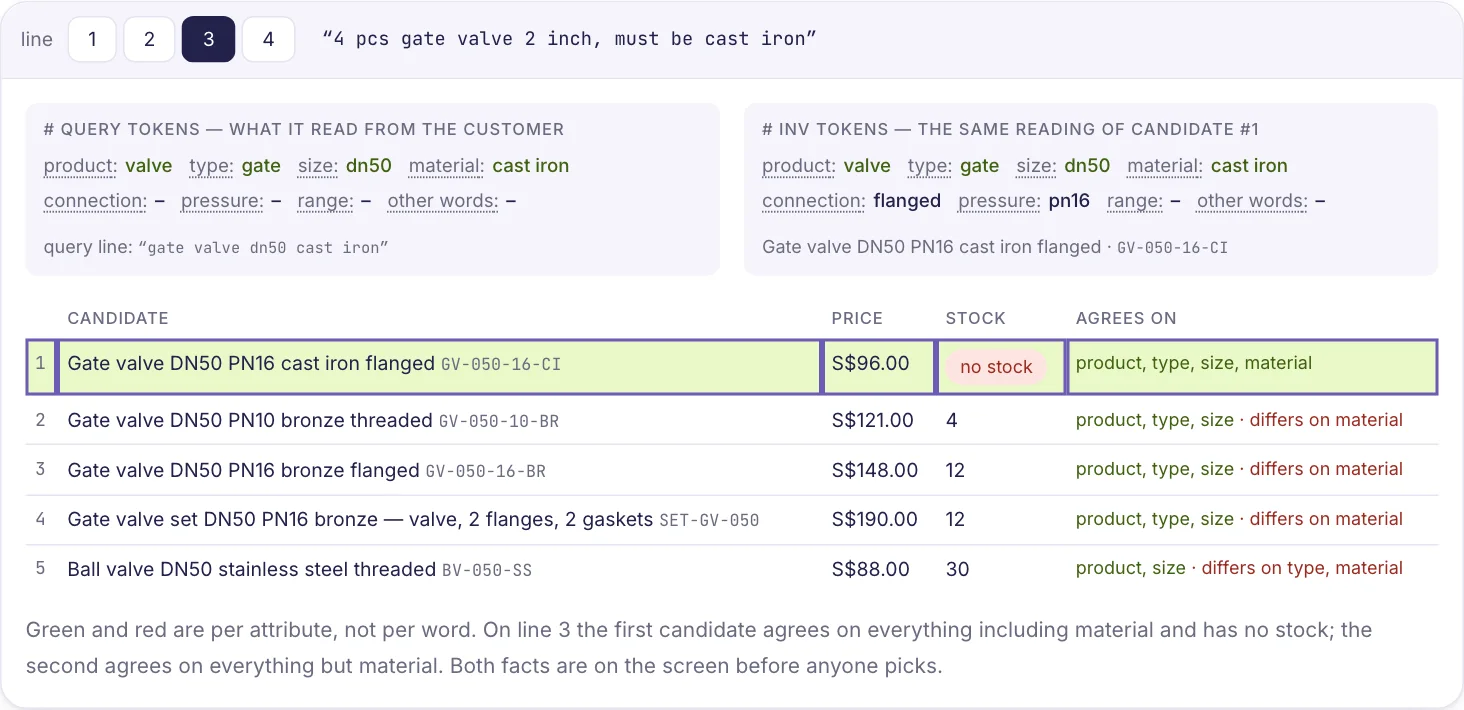
The open row has two toggles for this. Query tokens shows what was read from the customer's line and the exact query that was searched after normalisation. Inv tokens shows the same reading of each catalogue candidate. They are off by default, because on a line that is right they are noise. On a line that is wrong they are the whole answer:
- A wrong size or a missing product word on the query side means the customer's words were misread. Edit the line and re-run it.
- A right reading with a wrong item first means the catalogue side. Pick the right row and flag the case.
A word marked from vocabulary was added by a catalogue vocabulary rule, not by the customer, and it says so.
Inventory match
The candidates, best first, each with description, code, price, stock, and how often colleagues quoted it before — this item 6×, this kind of item in any size 9×. By default only the most likely rows are shown; Show more lists the rest. When the first row is weak, the right one is often two or three below.
The score beside each row is not hidden. In the replica it is literally one line of arithmetic, printed under the table: words explained, minus a quarter for every word the item adds that nobody asked for. The production ranker is richer, but the same rule holds: the number is explainable in the panel, or it is not shown.
A collapsed row carries a strength word — strong, fair, weak — and, when a past quotation for the same words picked a different row, a chip that says so: past quote is #2. That chip is the single most useful thing on the screen.
Quoted before
Past quotations for similar lines, who sent them, when, and a link to the email each came from. It is reference, not the decision: it tells you how a line like this was answered before. A ✓ beside an item means a past quotation and the catalogue match agree, which is the strongest sign the panel can give. Disagreement is not an error. It is the moment to look.
Correcting the question, not the answer
When a black box is wrong, the only move is to override it, and an override teaches nobody anything. When you can see what it read, you change the words it was given and watch the answer follow. Each row's query line is editable; Search re-runs it. Add a query line adds an item the splitter missed. A line can be removed. Pick and unpick are one click each, and the row says picked or auto accordingly.
Staff who work this way get faster every week, because they are learning the catalogue's vocabulary rather than the tool's moods.
The reply
The reply is assembled from what a person picked, in the house template: ITEM 1 / UNIT PRICE = … / description, with NO STOCK where the inventory row has none and NO OFFER where nothing in the catalogue explains the line. Above it, a count: N items · N auto, unconfirmed. Save to Gmail draft is disabled until that second number is zero. This is not a setting. It is arithmetic.
Nothing leaves the CRM until a person presses Save to Gmail draft, and nothing is sent until they press Send in the mailbox. If the enquiry changed since the panel was opened, the draft is marked stale.
The quotation document
The official sales quotation is a second draft built from the same picks, in Docs.
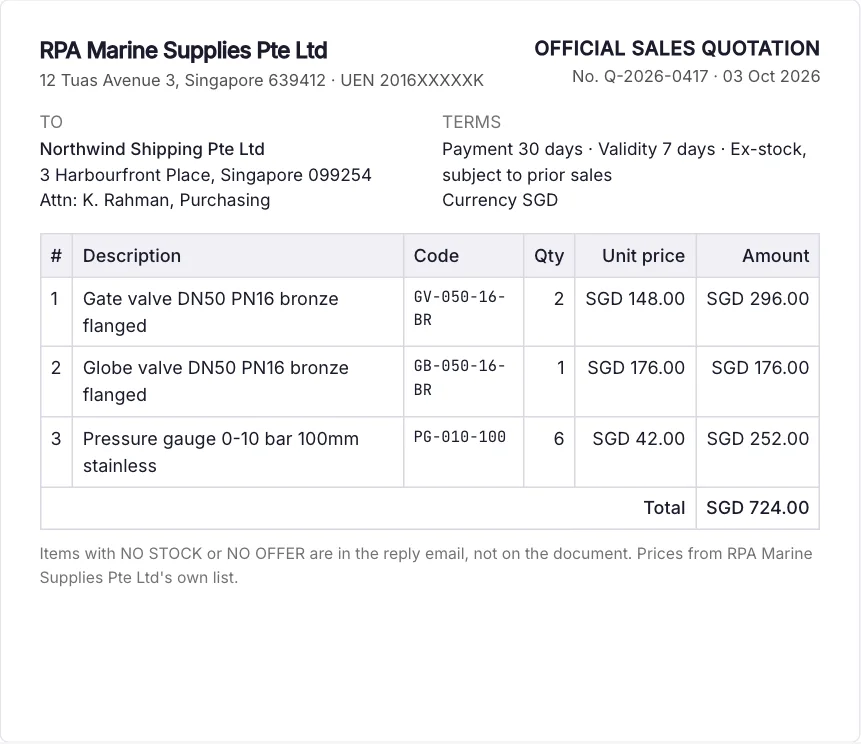
- Letterhead follows the customer's country, not the mailbox the enquiry came to. A Malaysian customer who wrote to the Singapore address gets the Malaysian letterhead, currency and price list. The panel says why it chose one. When it cannot tell, it suggests one and the person chooses — nothing is ticked for them.
- Customer block is pre-filled when the sender's email is on exactly one customer record; otherwise the person picks, or chooses none and fills it in Docs.
- Create draft takes no quotation number, so a test draft costs nothing. Issue gives it its number and locks it. An issued document cannot change under its number; a correction is a new document.
- PDF, Excel and JSON come out. The PDF is attached to the Gmail reply by hand — nothing is attached automatically, on purpose.
What it will not do
- It does not write to the mailbox by itself.
- It does not invent a price. An item with no price is left blank and flagged.
- It does not substitute for an item with no stock. It writes NO STOCK.
- It does not guess what a phrase means. It writes NO OFFER.
- It does not choose from a photograph.
- It does not borrow another workspace's credentials when a channel is not connected. It says not connected.
Each of these is a visible, slightly embarrassing admission. We prefer them to a confident wrong line on a signed quotation.
Measured, not claimed
Every deployment starts by replaying the last few hundred real enquiries the team already answered and scoring the tool against what was actually sent. That is the baseline. Every change after that is a paired run on the same cases — same lines, before and after — with the case count stated and the run saved.
The owner sees it in a Performance tab: which cases got better, which got worse, and a link to each one so they can disagree with the grader. The evaluation harness imports the live algorithm; it carries no copy, so a measured improvement is an improvement in the thing the team is using.
Internally the rule is blunt: a number without a run file behind it does not count.
Training the judgement before the clicks
Software does not change how a team works. People do, if they have decided to. So each rollout comes with a training floor inside the product, played on the team's own past enquiries:
- Is it an enquiry? A sorting game with no AI in it. The habit underneath everything else.
- Clean enquiries. Read, confirm rank 1 on every line, save, review.
- The right item is lower down. Open the line, read Inventory Match, pick by the customer's words.
- NO OFFER and NO STOCK. Re-run a line with corrected words; a set's component stock.
- Steer it. Flag, the add box, an enquiry inside an attachment.
A guided tour on the first case of each level only; the rest unguided with a hint. One-click flags on any panel line feed the next measured run. Quizzes ask about behaviour and screens, never figures. A verifiable certificate at the end, and the owner sees who passed and what each person got wrong.
The lesson under every level is the same: the first suggestion is a colleague's opinion. Read it like one.
A companion that knows the business
The same mascot that sits in the corner of every screen can be asked about the business itself — who sold the most this month, which quotations are going stale, what a customer bought last quarter, what is below reorder level. It answers through a read-only database account, and every answer shows the tool it chose and the query it ran before the rows.
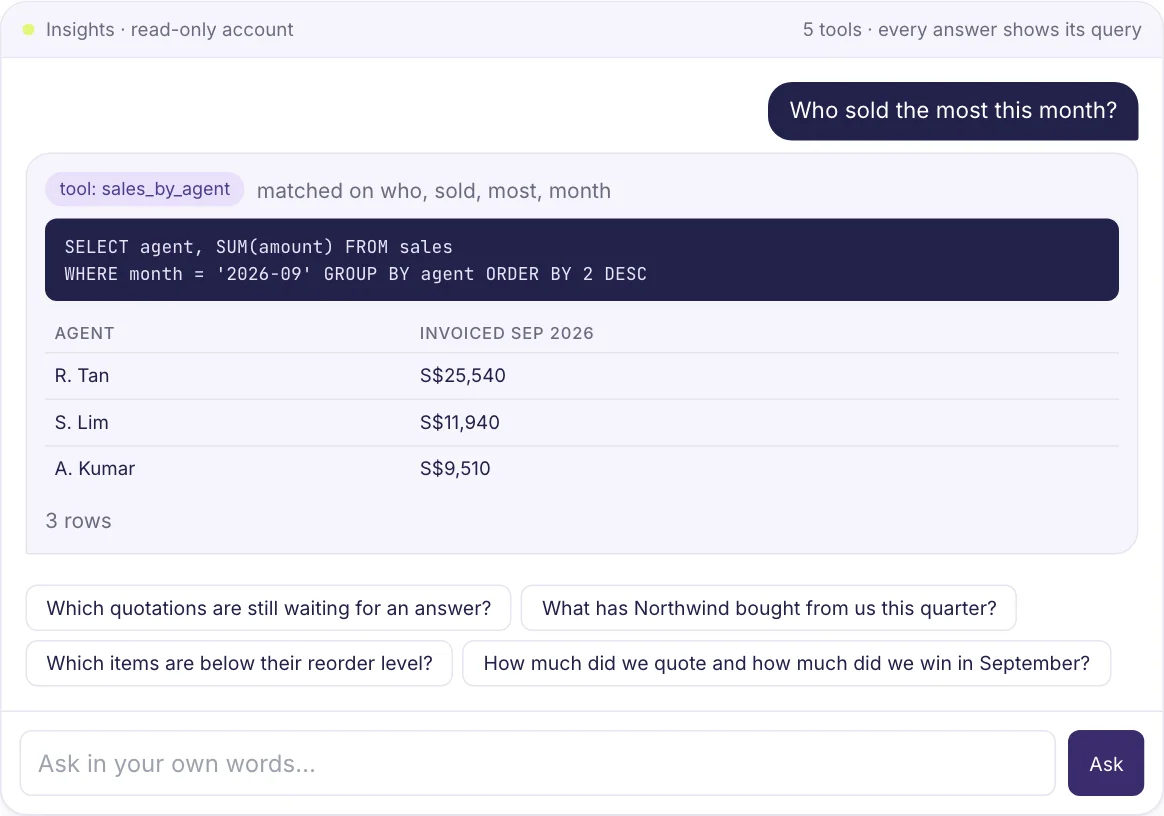
In the training course it has read every lesson and answers in those words. It says plainly that it cannot see your screen, and it will not hand out quiz answers. Read-only is not a setting someone can flip; it is an account that cannot write.
Why this is a mindset, not a feature
None of the above requires a better model. It requires a different contract between the tool and the person: show the reading, show the alternatives, show the history, count what is unchecked, measure on the past, and never act alone. Staff trained on that contract stop treating AI as an oracle and start treating it as a new colleague who has read everything and knows they will be checked.
That is the work RPA Scale does. The demos on the front page are a small, readable copy of it that you can take apart.